Tuesday, February 25, 2014

Fallout 3 - Windows 8 - GFWL - Games for Windows Live Marketplace - Games for Windows Software is missing - SOLUTION

I was struggling to get Fallout working on my system. I bought it a few months ago, registered it on Steam, but never got around to playing it.

When I first started Fallout 3, I could change the settings, but the "PLAY" item on the menu would just result in the window closing and nothing happening.

To solve this problem :

  1. Uninstall Microsoft Games for Windows - LIVE Redistributable
  2. Uninstall Microsoft Games for Windows Marketplace
  3. Uninstall Silverlight
  4. Reboot your computer
  5. Reinstall the Client for Marketplace here .
Now Games for Windows Marketplace should be working. 

Monday, February 24, 2014

Xplornet crippled a legacy unlimited service for a slower limited service

Just over three years ago, I signed up for an unlimited data 3Mbps service with Xplornet. The modem was a Motorola Canopy. We were paying $50/month including the modem rental.

The speed of the service wasn't terribly fast, never reaching anything beyond 2Mbps, but it was unlimited. Watching a video on YouTube would require some patience for buffering, however I never felt concerned about using the internet.

Over the course of the summer, the service became unstable. Tech support did not help other than telling us to change our phones so that they be off the 900MHz or 2.4GHz range. That did not help.

Eventually, they sent in an installer who pretty much told us we have to move up to a different service which is more expensive. It is supposed to be 5Mbps downstream. The data is limited to 20GB which means it is impossible to use Netflix, download the latest game that you bought on Steam.
With more than one device in the house, updates are also frustratingly because they often take several hundred megabytes.

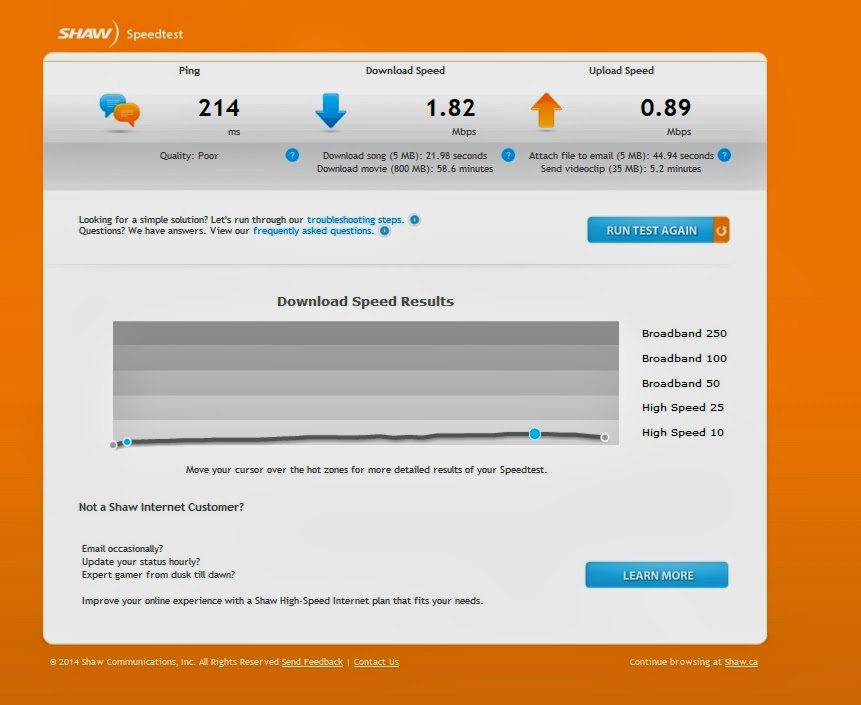
Nevertheless, here are some speed test results. Oh! What is 5Mbps anyways?


Friday, January 31, 2014

Hitman Absolution - Beautiful graphics, environment, and sound. Better AI and portrayal of women would have made it excellent

I just spent far too many hours playing Hitman Absolution. For the greater part, the game was fun.
When AI, Artificial Intelligence, is too good, the game is far too difficult to be fun. This game made me think that I am glad to not have aspired to become a police officer, fail in training, and default to become a security guard. These pawns were entirely disposable.

Other things that made little sense is the change into the uniform at each level. I understand that it is the character's distinctive look, but entering new environments, a disguise, even as a woman, would improve chances of success.
With regard to change of scenes or environments, were guards to be on high alert, opening a door seems to block them from moving all along to the next phase. Communication withing and between these teams seemed rather poor. I also would not like to be a guard, thinking how the disappearance of someone just spoken to has no influence on regular rounds. I somehow feel like the firefights killed the game which had so much potential.
 
I was quite frustrated with how the story was about the rescue of a girl.  I am not female, but the portrayal of women was not exactly balanced: all the police officers, miners, security guards were men. The few female characters were like concubines or attachées.
Some were well endowed femme fatales: the Saints, hypersexualized assassins dressed as nuns who received no character development, of course; Jade, an operator of the Agency; Layla, the wife of a manical weapon manufacturer.


Seeing that the writers of the game were all male, it is not a surprise that character development was not a strong point.

Monday, January 27, 2014

Free Downloadable FixMeStick Alternative - For Microsoft Windows PC or Mac OSX

FixMeStick was a featured pitch on CBC's Dragon's Den. The tool is intended to help when one cannot boot into their OS. The only times I have had a virus on my computer was the result of my experimentation. I downloaded a virus pack, and tried to launch some on my computer and see how well MSSE and ClamAV worked.

Certainly there are some people who always use administrator rights (or superuser) on their computer in order to save time when installing software, those who do not read what they install, or others who download and install the first item on the Bing or Google search results and then find themselves with malware on their computers.  Malware isn't necessarily software that will damage your computer or take your personal information, but unwanted pieces of software that force you to use a specific search engine, hijiack your operating system.

A write-protected system like a CD or DVD is ideal as it cannot be modified by the hackers in the stream (i.e. a host rerouting), however a disadvantage, like that of  FixMeStick, is the unified factor. Hackers know exactly what to target, thus the hacks, workarounds etc. are less labour intensive to develop. Therefore advantage of fragmented recovery setups is that hackers' tools cannot account for all of them.
If you were using computers between the years 1998-2007, Windows was synonymous with spyware,  malware, trojan and virus infections. Windows is a very secure operating system, but if more than 97% of the computers are running Windows, why would you bother creating malware for Linux or OSX. Most mobile phones are Android, and it is no surprise that we heard about viruses for Android... and later for iOS. Popularity comes at a price!

Before trying to make your own boot-up/recovery solution, I suggest try the free commercial solutions below:

The AVG Rescue CD
http://www.avg.com/ca-en/avg-rescue-cd-download
The AviraRescue CD
http://www.avira.com/en/download/product/avira-antivir-rescue-system


How the FixMeStick, or any bootable USB recovery system works

When you cannot get into your computer OSX or Windows based computer, the FixMeStick/RecoveryStick boots to its own operating system, bypasses OSX or Windows and then searches the hard disk for viruses, malware, or other unwanted changes to the registry and system start-up.

How the FixMeStick works  (or at least what would make sense)
  1. Computer boots to the OS on the FixMeStick.
  2. Devices on your computer are identified and the appropriate drivers are loaded.
  3. You will need to connect your computer to the Internet using either a WiFi or Ethernet connection (a USB modem tether would be fine too).
  4. Assuming that your router is not infected (rare, but possible), you will be asked to enter your Wifi password if applicable.
  5. The FixMeStick will update its virus and malware database. 
  6. Your Windows based drives will be scanned for malicious programs (not quite code, but series of instructions in hexadecimal information )
  7. If any infected files are found, they will be quarantined or deleted. If the Windows Registry requires modification, registry editing will be required.

Antivirus Software


The antivirus software packages available on the FixMeStick are :
There are free virus databases that are as up to date  as those used by the the three packages listed above. On the recovery disk that we are creating we can use any of the following as listed on Linux.org :
 There is also the Ubuntu Malware Removal Kit which could also be used.

Steps

Install Linux on a USB flash/thumb drive


  1. I recommend using Puppy Linux or Ubuntu Live and install it to a USB thumb drive. Puppy Linux is faster to download and easier to use, but Ubuntu offers better software support. For Windows prepare your USB drive using Rufus or any other ISO to USB tool. If your OSX computer is infected, it is also possible to install Linux to a USB stick. Instructions are found here : http://www.computerbastard.com/usbmac-puppy/

  2. Install all or some the antivirus software listed above. 
  3. Scan your computer's hard drive for malware or viruses. 
  4. Remove or quarantine the files
  5. If necessary, edit the registry or system configuration.


If you have any other recovery systems to share, please do below.

Funds Available - Department of Payroll lisa@jobforceteam.com via getresponse.com SPAM PHISHING ALERT


Hello,


I've been trying to get in touch with you. I apologizes for not getting this over to you sooner, but this is like the 3rd time I've tried to reach you, you must have not gotten my emails.

Based on your file, there are $6,000 worth of health beauty products and services at NO COST on hold which may be available in your name. You can enter and access for yourself or a close female friend.

Access your voucher $6,000 by clicking here

Reminder:  Your listed as begin able to process for yourself or a close female friend, which means you will want to list the person whom you wish to give your $6,000 voucher too. You can also get a no cost consultation for laser hair removal.

This process only takes 20 seconds. Please let us know ASAP, or we will be forced to remove the $6,000 voucher.

Access the $6,000 voucher by clicking here


Best Regards,
Sharon Rivers
Benefits Program Consultant
Health Release Program


This transmittal and/or attachments may be legally privileged or confidential. If you are not the intended recipient, you are hereby notified that you have received this transmittal in error; and you are requested to notify the sender immediately by reply or by telephone and immediately delete this message and any attachments. Any review, dissemination, retention or copying of this transmittal is strictly prohibited. Please consider the environment before printing this transmittal and any attachments.

Manus Staffing, 207 Mineola Ave Suite 529, Roslyn Heights, NY 11577, United States
You may unsubscribe or change your contact details at any time.

Thursday, January 16, 2014

The 5 Year Detox Plan

After the holiday season, some people feel obliged to do something good for their bodies. The detox myth has been long demystified and featured on Marketplace. The following is a simple detox plan. No need to eat "superfoods", keep on eating bread and other products with gluten. Eat as much locally produced food as possible.

The steps to a clean body in 5 years or less :
  1. Start everyday with about half an hour of exercise.
  2. Eat a balanced breakfast which includes a large amount of carbohydrates (bread, rice, oats, millet, corn), a portion of fruit or vegetables and some beans, seeds(ie. sunflower, pumpkin) or nuts (including nut butter).
  3. To be physically fit is more than a few minutes of exercise a day. If you work in an office, set up your workstation to be standing rather sitting. To be happy, change jobs to start working working outdoors, such as farming, construction, surveying, or something where you must walk a lot like waiting tables, working in a daycare, nursing etc. 
  4. As for lunch and for supper, a balanced meal must be colourful. It would mean a variety of vegetables, different grains and the use of oils. All edible vegetable oils, including peanut, soy, canola, flax/linseed, sesame, olive, avocado, coconut oil are good to use on a daily basis.
  5. If not already engaged in a community activity, take part in sports like ice hockey, curling, soccer/football, lacrosse, running, skiing, snowboarding, cycling, running, tennis, badminton, etc.
  6. The most important of all requirements for a healthy body is sleep. The more physical activity we do, the better we sleep. 
The body's liver will do most of the work of keeping your blood and body clean. As long as you regularly treat your body well, you will be in good shape. 

Wednesday, January 15, 2014

Windows 8.1 makes the touchscreen and your mouse obsolete.

Face it : a mouse is great for drafting and some web pages, but it is far from ideal for productivity; a touchscreen is... a touchscreen - unpredictable and gives the users no tactile(haptic when hovering ?!?) or visual feedback for actions. It is unfortunate that mobile phone developers have taken that route and that the trend caught on for tablets and PCs.

I am currently repeating my opinion that Microsoft did an excellent job with Windows 8.1. As long as you have a the most basic computer vocabulary and know where to locate the Windows Key, you can use the computer.
No need to learn all the shortcuts, but just tap the Windows Key and enter a term : reset, settings, reboot, the name of a software package - Excel/Steam/DraftSight...

I use the mouse for a few items, such as mouse over for certain icons in Word, Perapera Kun ( or just now to use the Blogger Associate/link function), but really you can do so much with the keyboard even in Windows 8.1.