The "Back to School" season is a time when everybody can start anew, define priorities, be more disciplined about past endeavours, or start being engaged about something. While many may dread the back to school specials found at most retailers, other look at the opportunity to get a new computer.
For most, any dual core machine with 2 to 4GB of RAM will be sufficient to surf the Internet, use a word processor ( Microsoft Word, LibreOffice Writer ) and a spreadsheet like Excel or Calc.
The projects and demands of the past decade are more complex than those from the later part of the 20th century. If you are working in a specialized discipline such as musical composition or graphic design, it would be well worthwhile to look into the business class machines with dedicated GPUs (for graphics) from HP, Dell or Lenovo. Workstations have longer lives and will be suited to any task. If you are going to be typing, I strongly recommend getting a ThinkPad. The T and W series keyboards are second to none. I also really appreciate the the fact that there are fan control tools available.
If gaming, workstations are going to be fine, but the reader should be doubtful of the premise of this paragraph: we are talking about "Back to School" laptops. Nevertheless, I recommend a system with a ATI/AMD Radeon GPU. Unfortunately, the Nvidia hardware and drivers have given me a lot of problems, including severe tearing in video and 3D processing, like playing a game, watching a video on YouTube or in a video player from a local file. This problem has been common on desktops as well as laptops Nvidia GPUs.
I do not agree with the whole of this article, however the point about storage no longer being a concern is quite accurate. I fare quite well with at 64GB SSD. The reason I upgraded to an SSD was not so much for speed, but the absence of noise.
Showing posts with label amd. Show all posts
Showing posts with label amd. Show all posts
Thursday, November 1, 2012

Wednesday, October 12, 2011
How to overclock an AMD A6-3400 ( Llano A4 A6 or A8 )
Introduction
If you have recently acquired a system with an AMD Llano A4, A6 or A8 CPU, it is very likely that you will be able to overclock it by several hundred Mhz and have benchmarks that exceed the Intel Sandy Bridge i3 and i5 cousins. Call me a jock or a motor head of computing, but pushing anything to the limits of my system is a little like gambling. You never know how far you can go!
DISCLAIMER
Overclocking may damage your
computer or void your warranty. Perform at your own risk. The author of
this blog is not liable for any damage that may be caused to a system
by following the instructions here provided.
This guide is based on the video on
Youtube by iMadeBoss and previous experience undervolting my CPU to keep the
fan off as long as possible. This
is an excellent guide if you are using an Intel CPU. This guide is also useful for AMD processors.
How can you undervolt or overclock?
The purity of anything you may find,
man made or natural, varies. As for the silicon that is used to make
integrated circuits, as well as the chemicals which are used to dope
the silicon to make circuit lithography, it is impossible that one
chip will be identical to the next. Sometimes, not 100% of the chip is going to have the theoretical electrical and physical properties that may be found in laboratory or software simulated conditions. It is therefore unlikely that
theoretical voltages and frequencies will be possible on products which are made in very large quantities that can be assured to a certain standard of stability and error.
I find the multicore systems have some resemblances to the brain. Although the brain has specific regions for certain functions like language, vision etc. a computer equally has that functionality, however if a section of a computer is damaged, it is likely the whole will not work. In contrast, the parallel processing of a brain allows a certain amount of damage to be sustained before any functionality is lost. A multicore processor will have one or more cores activated according to load and temperature in order to prevent overheating and assure system stability. What would happen is a single core is damaged? Would the chip be able to continue to function? Some time ago AMD did release 3 core CPUs which were assumed to be initially 4 core, however the stability of the 4th core was not meeting specifications so it was downgraded to a 3 core system. Regardless, let's hope that no cores get damaged here!
Software required
Although you can test the change in performance through benchmark software such as Geekbench or Passmark, the WEI (Windows Experience Index) albeit long, does a more thorough testing of different calculations and is the most likely to crash should there be a problem with your overclocking settings.
I will provide Passmark scores because they do provide a little more information than the WEI.
Using the software that you would normally use would be a good test to see if the system is stable. That could include encoding video, audio, playing video games or complex modelisation of seismic activity. If you are writing a blog like this one, or doing simple photo manipulation, you'll probably be happy with a 233Mhz machine that does not require a heatsink. After 15 years of using computers, I now believe that comfort is the most important. That includes a high resolution screen, a keyboard with excellent tactile feedback (eg. Lenovo ThinkPad), and of course silence. It is ironic to for me to write about overclocking which would require more cooling and forced air that makes noise, but I learnt about undervolting so that my battery can last longer and my CPU stays cooler without making the fan turn.
How to change the frequencies of the CPU modes
K10Stat is a simple tool with a GUI to enable everyday users to change voltage and frequency settings an AMD processor. FID is the processor's frequency multiplier ( which are unlocked) and DID is the P-state, or Power State, of the processor to allow energy savings when CPU load is low.
If you start using K10Stat, do the following :
- Make a profile called default, and apply to save settings
- Create a new profile called Undervolt.
- Create another profile called Overclock.
Furthermore, I strongly recommend that you get a fan control program for your laptop as well as OpenHardware Monitor such that you can see what is the status of your hardware.When your CPU or GPU gets into the 90C temperature range it is unlikely that it will be able to sustain that temperature for very long. Although 90C may seem hot to us, the systems are designed to stay a lower temperature for comfort and safety, however what is most likely to cause damage to your hardware are not high temperatures, but changes in temperature which lead to expansion and contraction. Creep, that is slow changes in the physical properties due to stress, can also lead to problems if the device or integrated circuit is beyond its operation limits.
Which settings to change in K10Stat ?
- K10stat clock control function is disabled up 0 down 0
- For each P state ( P0 - P6) you can change the frequency with FID and DID and CPU Voltage
- When changing the FID and DID, make sure that the boost B0 and F0 frequencies are in gradual changes. For example, do not change S0 from 1400 MHz to 3200 MHz. It is fine leaving a more significant gap for the boost frequency, but moderation is best.
- The higher the voltage, the more power ( remember Power = Voltage x Current) however to maintain stability at higher frequecies, you may need higher voltages. This where one will have to pay attention to the temperature when overclocking. Too high a voltage, the system will get hot very quickly and may get damaged if the cooling system feedback has too much delay.
- The settings you see below may be similar to what you can overclock to. However every chip is different, so I recommend that you experiment and keep an eye on the temperature and stability of your system rather than trying to match the settings from another chip of the same model. Sometimes binning of a same wafer is what makes a chip a A6 instead of an A8 where as it may seem to work perfectly fine at A8 specifications.


As an example, here are my results, or benchmarks, with an A6-3400m using Passmark before and after an overclock.
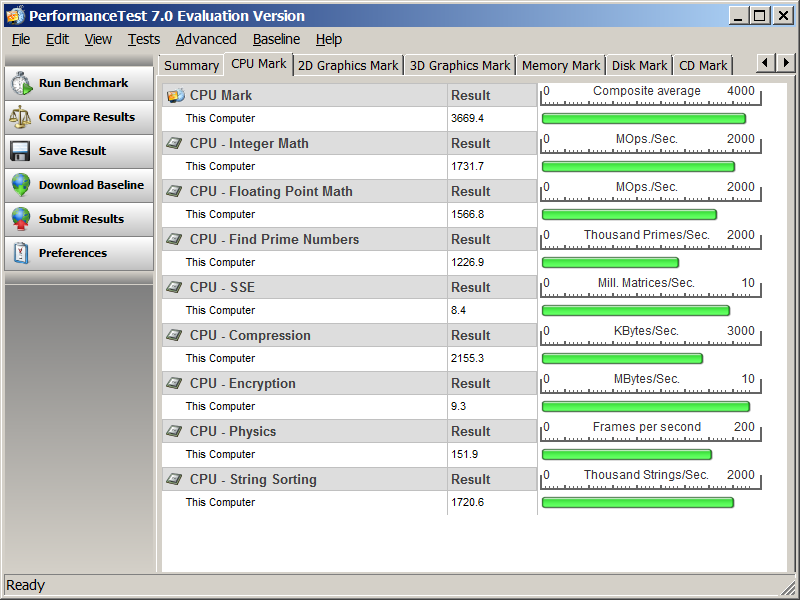

A CPU rating of 7.3 is not too shabby for a 450$ laptop (OCT-2011). I may be able to bring it higher, but I have had my fun with overclocking for today. Mind you, I should upgrade the RAM. Apparently the Llano APU does much better with faster RAM.

Subscribe to:
Posts (Atom)